
Dropbox Sign for Procore Expands Support for Invoices, Change Orders and More

Updated: Sep 22
Shake IT has released a new version of Dropbox Sign for Procore, extending electronic-signature support to additional Procore financial tools and giving customers more control over where executed documents are stored.
This release reflects our continuing commitment to making contract execution in Procore as intuitive and easy as possible. Our aim is to let users send documents for signature, track their progress and save completed agreements without leaving Procore or relying on disconnected manual processes.

Support for invoices
Dropbox Sign for Procore now supports:
Prime Contract Payment Applications
Commitment Requisitions
The release adds support for these records, which are also commonly referred to as invoices. Both the beta and non-beta versions of these Procore tools are supported.
Users can now initiate the electronic-signature process from the relevant invoice record using the Dropbox Sign side panel in Procore. Once signing is complete, the executed document can be returned to Procore and stored with the associated project record.
This extends the connector beyond contracts and change orders, allowing customers to use Dropbox Sign across more of the commercial and financial workflows they manage in Procore.
Update to version 2.1.0
If the Dropbox Sign side panel does not appear when you open a supported Prime Contract Payment Application or Commitment Requisition, your Procore administrator may need to update the Dropbox Sign for Procore app.
The app should be updated to version 2.1.0 through Procore App Management.
Once the latest version is installed and the required permissions are available, users should be able to access the Dropbox Sign workflow from the supported Procore tools.
Save executed documents directly against self
This release also introduces a frequently requested storage option for executed change orders and invoices.
Previously, executed change orders and invoices were stored against their parent records. For example, an executed change order could be attached to the associated commitment or prime contract rather than to the individual change order.
Customers can now configure the connector so that the executed file is attached directly to the change order or invoice itself.
This makes it easier for project teams to:
Find an executed document from the record they are already viewing
Keep documentation associated with the correct transaction
Understand exactly where a completed document has been stored
Maintain a clearer and more accessible project record
Reduce the need to search through parent records for related documents
How to enable the new storage option
To attach executed change orders and invoices directly to their own Procore records:
Open the Dropbox Sign side panel.
Select the three-line menu in the upper-right corner.
Select Configure Side Panel.
Expand Storage Settings.
Disable the applicable options for attaching executed documents to their parent records.
Select Save.
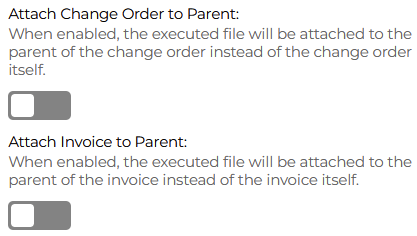
Future executed documents will then be stored according to the updated configuration.
Additional improvements included in the release
The release contains several other enhancements intended to make Dropbox Sign for Procore more consistent and easier to use.
More consistent filenames
We have improved how filenames are generated across supported workflows.
Consistent filenames make executed documents easier to identify, search for, download and share. They also help teams maintain a more orderly project record, particularly when managing a large number of contracts, change orders and invoices.
Improvements to request templates
We have updated the user interface for request templates to make templates more intuitive to work with when preparing signature requests.
Templates can help teams standardize repeatable signing processes, reduce setup time and improve consistency across projects and users.
Updates to the Signatures Dashboard
The Signatures Dashboard has also been enhanced.
The dashboard gives users a central place to view and track signature requests initiated through the connector. This helps teams monitor document progress without needing to leave Procore and separately search within the Dropbox Sign application.
A more connected contract-execution experience
Construction teams already manage their projects, contracts and financial records in Procore. Electronic signature should fit naturally into those existing workflows.
Dropbox Sign for Procore is designed to provide a connected process:
Open the relevant record in Procore.
Prepare and send the document using the Dropbox Sign side panel.
Track the signature request from within Procore.
Save the completed document back to the appropriate Procore record.
This reduces context switching and helps ensure that executed documents are returned to the system where project teams expect to find them.
Our focus is not simply on connecting Dropbox Sign and Procore. We want the full process of sending, tracking and saving executed documents to feel like a natural part of working in Procore.
Continuing to extend support across Procore
Shake IT is committed to steadily expanding the range of Procore tools and document types supported by the connector.
Many of our product enhancements begin with direct customer feedback. As customers identify additional records and processes that would benefit from electronic signatures, we evaluate how those workflows can be added while maintaining a consistent and intuitive experience.
Our development priorities remain focused on three outcomes:
Supporting more Procore tools and document types
Reducing the number of manual steps needed to execute documents
Making completed documents easy to track, retrieve and store correctly
The addition of Prime Contract Payment Applications and Commitment Requisitions is another important step in that journey. We will continue working to make Dropbox Sign available across more of the contract, commercial and project workflows our customers manage every day.
What should we support next?
If your organization uses a Procore tool that Dropbox Sign for Procore does not currently support, we would like to hear from you.
Let us know which record type or workflow you would like to use with Dropbox Sign. Customer feedback helps us understand which capabilities will deliver the most value and informs how we prioritize future releases.
If you need assistance updating to version 2.1.0, configuring the new storage options or using the invoice workflows, please contact the Shake IT team.
We are always happy to help make sending, tracking and saving executed documents in Procore simpler and easier.
Send us your suggestions at support@shakeit.ai


